LDCloud
Центр пополнения
Скидки
Русский
LDCloud Synchronization Operation Tutorial
Время обновления:2026-10-29 10:11:30
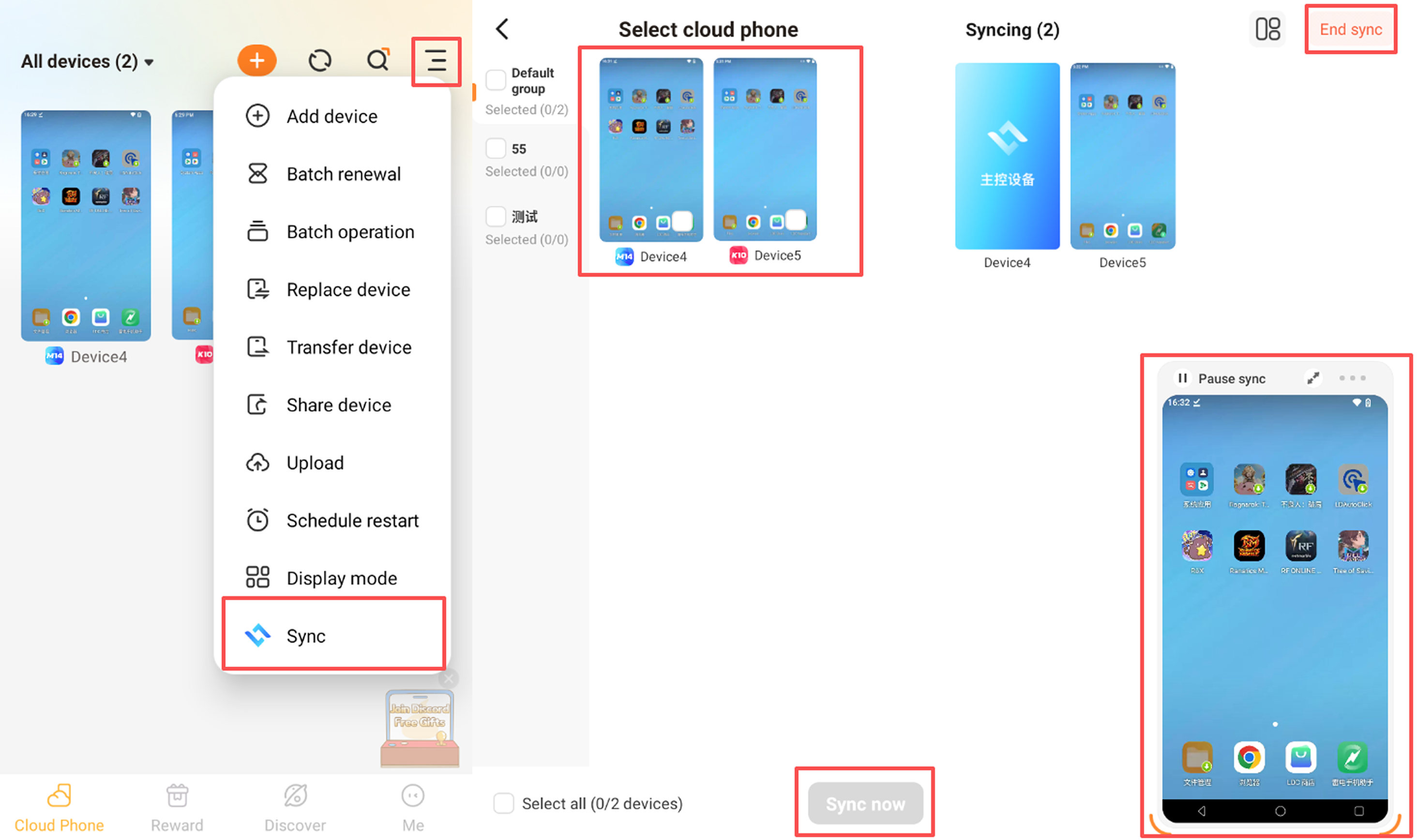
Synchronization allows you to operate the master device and broadcast your actions in real time to other selected devices, so multiple devices run the same operations simultaneously. This feature is suitable for scenarios such as multi-account AFK farming and bulk task execution. The first device you select becomes the master device. Once synchronization is enabled, all other devices will follow the master device’s actions.
Operation Steps
Step 1 · Access Synchronization: After launching the client, tap the menu button (☰) in the upper-right corner, then select Synchronization at the bottom of the menu.
Step 2 · Select Devices and Start Sync: Check the devices you want to sync from the device list, then tap Start Sync at the bottom right. Synchronization will activate once the operation window pops up. Any actions you perform on the master device will now run on the other synced devices.
Notes
Synchronization is only available on the latest LDCloud client. Older versions do not support this feature. You may download the latest version at https://www.ldcloud.net/. How to exit: Tap Exit Sync in the upper-right corner while the feature is active.