LDCloud
Recharge
SALE
English
How to use device sharing function
Update Time:2026-06-10 17:07:57
I. Mobile Terminal: Cloud Phone Sharing Authorization (Share Your Cloud Phone with Friends)
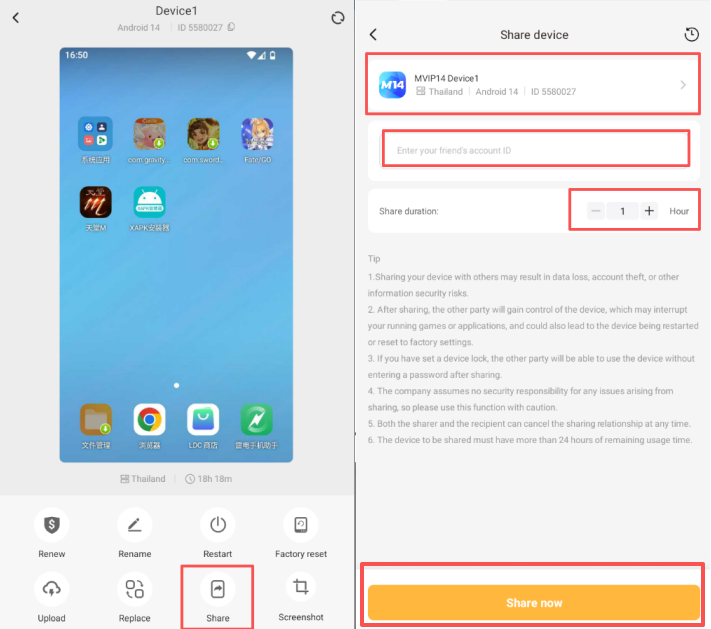
Tap to enter the function page of your cloud phone, then select the Share button.
On the sharing page, confirm the target cloud phone displayed at the top. Enter your friend’s cloud phone account and set the authorized usage duration.
Tap Share Now at the bottom of the page to complete the authorization.
Return to the cloud phone homepage and refresh the page. Labels reading "Shared by Me" and "Shared with Me" will appear in the upper left corner of each cloud phone to distinguish sharing status.
II. Mobile Terminal: How to Revoke Sharing Authorization
There are two ways to cancel sharing authorization:
Automatic revocation: The system will automatically terminate all access once the authorized time expires.
Manual revocation: You may cancel authorization actively at any time.
Operation steps:
Enter the target cloud phone’s function page and open the Share tab.
Locate and tap the Cancel Sharing button on the page to immediately revoke all access rights.
Important Reminders
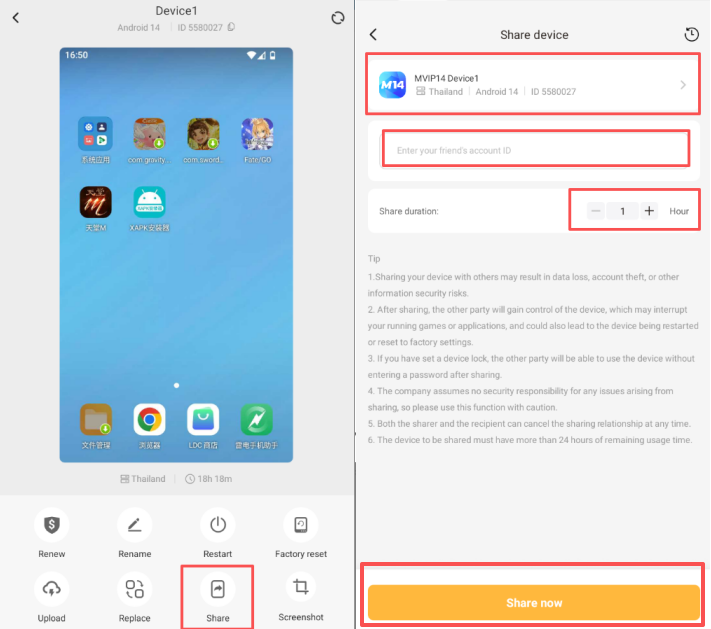
Sharing your cloud phone with others carries information security risks including data loss and account theft. Please use this feature with extreme caution.
After sharing is confirmed, the recipient gains full control of the cloud phone. This may interrupt your ongoing games or apps, and could even result in forced device restarts or factory resets.
The company shall not be liable for any security breaches, losses or damages arising from cloud phone sharing. Users shall bear all associated risks at their own discretion.
Both the sharing party and recipient may terminate the sharing authorization at any time.
For inquiries, please contact our online customer service.